Downloads

(Copyright by the Lebanese Language Institute)
This is how it works:
The additional letters to the regular keyboard are in upper and lowercase description: Ḋḋ, Ġġ, Ḣḣ, Ḱḱ, Ṫṫ, Ṡṡ and Żż.
Shift plus d, g, h, k, t, s or z on your keyboard yields ḋ, ġ, ḣ, ḱ, ṫ, ṡ or ż respectively on your screen.
Caps Lock plus Shift plus D, G, H, K, T, S or Z on your keyboard yields Ḋ, Ġ, Ḣ, Ḱ, Ṫ, Ṡ or Ż respectively on your screen.
Note: The Lebanese Letters are all Unicode 5.0 compatible, and the best font to use with the Lebanese letters is “Tahoma”
Instructions
- Download the keyboard file ( right click and save as…)
- Unzip the zipped file
- Open the directory “Lebanese”
- Run the “setup” program
- Follow instructions
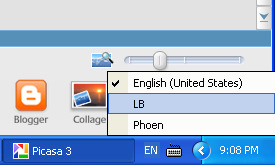
- You will see a language toolbar somewhere on your screen (bottom right), select “LB” to switch to Lebanese keyboard, or you can also press left CTRL plus SHIFT to switch between keyboards.
For any comments on the Lebanese keyboard, please contact us and let us know.
———————————————————–
DOWNLOAD the latest common fonts
When you download the latest fonts, you can see the Lebanese letters the way they should be seen. Even though older font sets will display the proper characters, the look of these characters might not be inline with the rest of the letters.
Instructions
- Download the SFonts.zip file ( right click and save as…)
- Unzip the zipped file
- Open the directory SFonts
- Copy and paste the new fonts into your C:\WINDOWS\Fonts Directory
- Overwrite the older fonts if they exist.
- You’re done!
———————————————————–
FOR MAC USERS:
The Lebanese keyboard for MAC is also simple and easy to use. You do not need to install any additional fonts. All you need to do is download the keyboard from the link provided below and put it in your “Keyboard Layouts” folder under the “Library” folder on the main disk.
How it works: It works the same as the English keyboard. Your use of your English will remain unaffected, and you can revert to it at any time. The Lebanese keyboard makes use of the Option key and CAPS button to allow typing in the 7 additional characters in Lebanese.
The additional letters to the regular keyboard are in upper and lowercase description: Ḋḋ, Ġġ, Ḣḣ, Ḱḱ, Ṫṫ, Ṡṡ and Żż.
“Option” plus d, g, h, k, t, s or z on your keyboard yields ḋ, ġ, ḣ, ḱ, ṫ, ṡ or ż respectively on your screen.
“Caps Lock” plus “Option” plus D, G, H, K, T, S or Z on your keyboard yields Ḋ, Ġ, Ḣ, Ḱ, Ṫ, Ṡ or Ż respectively on your screen.
Note: The Lebanese Letters are all Unicode 5.0 compatible, and the best font to use with the Lebanese letters is “Tahoma”.
Instructions:
- Download the keyboard file ( right click and save as…)
- Put the keyboard file in your “Library”>>”Keyboard Layouts” folder
- Restart your computer
Make sure that your keyboard has the .keylayout extension. Sometimes it downloads as lbkmac.keylayout.xml instead of lbkmac.keylayout. Therefore, you have to remove the .xml ending and rename it.
You will see a language toolbar somewhere on your screen (top right), select “L.B.” to switch to Lebanese keyboard.
